Your ProductiveBot ships with a built-in security suite that protects against unrecognized or unauthorized software. This is by design — it keeps your system safe.
To install skills from this store, you need to run a quick one-time activation that registers the Skill Store as a trusted source. This also checks your system for any important updates.
Every skill in the ProductiveBot Skill Store is vetted and verified by our team before it's listed. The activation takes about 5 seconds, and you only need to do it once. After that, every skill here will install seamlessly.
Already activated? You're all set — browse the skills below.
OpenClaw 2.0 Support Bridge
Free Support ToolNew
Give Scout a safe report when an update disconnects your assistant
By ProductiveBot · Version 1.0.0 · Last updated September 2, 2026
Use this read-only bridge when OpenClaw 2.0 or ProductiveBot 1.0.8 leaves the gateway, Slack, provider login, or configuration in a confusing state. It creates a private local rollback copy and a separate secret-safe report for Scout. It does not edit your configuration, install software, restart services, or delete anything.
Compares ProductiveBot, OpenClaw, Node, and gateway paths
Detects known OpenClaw 2.0 half-migration signals
Preserves a private local rollback copy before support
Produces a bounded Scout-Support-Report.txt
Use with Scout: Download and run this only when Scout asks for an OpenClaw 2.0 support report. Send Scout the report file, never the private rollback folder.
Add a second AI teammate you can talk to right away
By ProductiveBot · Version 1.0.0 · Last updated May 15, 2026
Install Hermes Agent alongside ProductiveBot as a separate AI teammate. Hermes runs in Terminal, supports messaging gateways, skills, memory, tools, cron jobs, and multiple model providers. The installer creates a Desktop launcher so you can start chatting immediately, then optionally configure Slack/Telegram/Discord and coordinate handoffs with your OpenClaw-based ProductiveBot.
Installs the official Hermes CLI from Nous Research
Creates a Desktop launcher: Start Hermes Agent
Works with OpenRouter, Anthropic, OpenAI, Codex OAuth, Nous, and local models
Optional Slack, Telegram, Discord, email, and API gateway setup
Sidecar install — does not replace your ProductiveBot
Includes safe handoff guidance for OpenClaw coordination
You need: Your ProductiveBot Mac Mini and a model/provider for Hermes. If you do not have one yet, Hermes setup will walk you through options.
Persistent memory for ProductiveBot and Hermes Agent
By ProductiveBot · Version 2.5.4 · Last updated July 27, 2026
TotalRecall™ v2.5 is ProductiveBot's local recall layer for OpenClaw and Hermes Agent. One command searches supported memory files, preserved sessions, Hermes' durable conversation store, documents, and connected local crawlers such as Slack—then labels each result with its source. It works on OpenClaw, Hermes-only, or dual-agent setups, with keyword search available even when optional semantic search is unavailable.
Source-tagged recall across supported local sources
Fresh OpenClaw and Hermes sessions can retrieve Hermes durable chat history
Engine-aware install — OpenClaw, Hermes Agent, or both
Local-first search; connected sources remain subject to their own setup and access
Proven on the ProductiveBot test Mini in Hermes-only and cross-runner recall tests
No separate memory API required for local keyword recall
Before installing: Use this on a ProductiveBot Mac with OpenClaw, Hermes Agent, or both. If an OpenClaw update is offered, use the ProductiveBot-supported update path and confirm the gateway is healthy first. Hermes-only machines are supported.
Use your ChatGPT subscription instead of API tokens
By ProductiveBot · Version 2.0.0 · Last updated August 27, 2026
Stop paying for API tokens. If you have a supported ChatGPT subscription, this skill connects it directly to ProductiveBot through OpenAI's official OAuth, selects GPT-5.6 Terra through the Codex runtime, and verifies a real tool call before reporting success.
Replaces API token billing with your flat-rate subscription
GPT-5.6 Terra with verified Codex-runtime routing
Official OpenAI OAuth, same secure login as ChatGPT
Tokens refresh automatically, no re-login needed
Two-minute setup, no terminal experience needed
Switch between providers anytime
You need: A supported paid ChatGPT subscription and a healthy ProductiveBot-managed OpenClaw runtime. If an update is needed, use the ProductiveBot-supported path; do not ask a disconnected assistant to update itself.
Know what the market actually thinks — not just what gets posted
By ProductiveBot · Version 2.0.0 · Last updated May 5, 2026
X Research searches X/Twitter for top posts on any topic, reads the full reply threads, and delivers a structured brief with intent-classified signals (complaints, feature requests, switching signals, buying intent). Used by ProductiveBot customers for competitor monitoring, trend spotting, and customer pain point discovery. Requires an xAI API key (~$5-10 to start, pennies per query).
Searches X via Grok API — first-party data, no scraping
You need: An xAI API key from console.x.ai, plus a healthy ProductiveBot-managed OpenClaw runtime. If an update is needed, use the ProductiveBot-supported path.
Manage your Facebook & Instagram ads in plain English
By ProductiveBot · Version 1.1.0 · Last updated May 11, 2026
Meta's official AI Connector lets your ProductiveBot manage campaigns, pull performance reports, adjust budgets, check pixel health, and more — all through natural language. No Ads Manager required. Built on Meta's officially supported MCP server released April 2026 — no ban risk.
Pull campaign reports, ROAS, CPA, CTR by ad set
Create, pause, and adjust budgets in plain English
Check pixel signal health and conversion quality
Manage product catalogs and troubleshoot feed errors
Built on Meta's official AI Connector — zero ban risk
Agent learns your account, goals, and targets on setup
You need: A Meta Business Manager account at business.facebook.com with Admin access. Free to connect — no API keys, no developer account needed.
Your ProductiveBot's security suite blocks unrecognized software by default. This quick activation registers the Skill Store as a trusted source and checks for any system updates.
Step 1 — Open Terminal
Find Terminal in your Dock or Applications. You can also press ⌘ + Space, type Terminal, and hit Enter.
Terminal
Applications → Utilities → Terminal
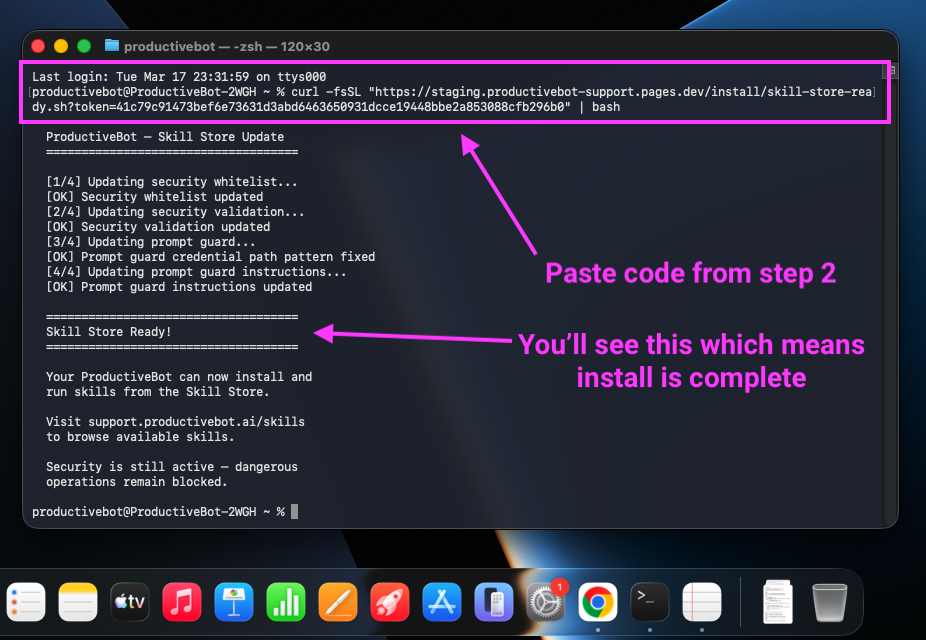
Step 2 — Paste the activation command
Click the button to generate your personal command, then paste it in Terminal and press Enter:
Personal to your account. Expires in 1 hour, works once.
Step 3 — You're done
When you see "Skill Store Ready!" in Terminal, the activation is complete. You only need to do this once — every skill in the store will work from now on.
You'll see "Skill Store Ready!" when the activation is complete.
What this does: Registers the ProductiveBot Skill Store as a trusted source with your security suite, and checks for any important system updates. Your security stays fully active — it still blocks anything that isn't a verified ProductiveBot skill.
Choose your install method — both take under a minute
Step 1 — Install TotalRecall
Click the button below to generate your personal install command, then send it to your bot:
This link is personal to your account. It expires in 1 hour and works once.
Your bot's security features may block this command. If your bot refuses, switch to the Terminal tab instead — it runs the same installer directly and works every time.
After installation, try saying "Remember that my favorite color is blue" and then in a new conversation ask "What's my favorite color?"
Step 1 — Open Terminal
Find Terminal in Applications → Utilities, or search with Spotlight (⌘ + Space, type "Terminal").
Step 2 — Install TotalRecall
Click the button to generate your install command, then paste it in Terminal:
This link is personal to your account. It expires in 1 hour and works once.
Password prompt: During installation, Terminal will ask for your Mac password. This is normal — it's needed to update system components. Type your password (it won't show characters) and press Enter.
After installation, tell your bot "Remember that my favorite color is blue." Then start a new conversation and ask "What's my favorite color?" — it should know.
Install ChatGPT OAuth
Two quick steps to connect your ChatGPT subscription.
Step 1 — Add the skill
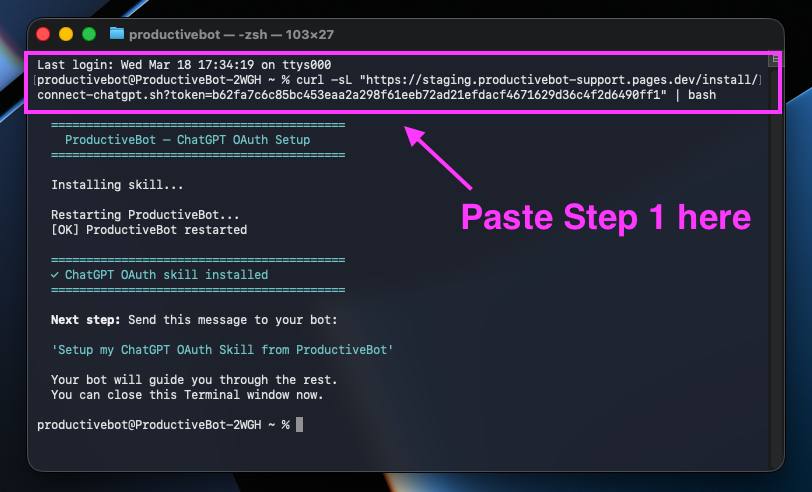
Open Terminal on your Mac Mini (press ⌘ + Space, type Terminal, hit Enter) and paste this command:
Personal to your account. Expires in 1 hour, works once.
You'll see this output when the install is done.
Step 2 — Message your bot, not Terminal
After the Terminal install finishes, copy the message below and send it to your ProductiveBot chat.
Do not paste this into Terminal. Paste it into the same Slack, Telegram, Discord, or web chat where you normally talk to your ProductiveBot.
Setup my ChatGPT OAuth Skill from ProductiveBot
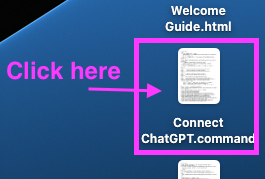
Your bot will put a "Connect ChatGPT" shortcut on your Desktop. Double-click it, log into ChatGPT, and everything else happens automatically.
Look for "Connect ChatGPT.command" on your Desktop.
You need: A ChatGPT Plus, Pro, Business, or Enterprise subscription. Don't have one? Sign up at chatgpt.com. The whole process takes about two minutes. By connecting, you agree to follow OpenAI's Terms of Use.
Install X Research
Two steps to set up market intelligence from X/Twitter.
Step 1 — Add the skill
Open Terminal on your Mac Mini (press ⌘ + Space, type Terminal, hit Enter) and paste this command:
Personal to your account. Expires in 1 hour, works once.
Step 2 — Tell your bot
After the install finishes, send this message to your ProductiveBot:
Setup my X Research Skill from ProductiveBot
Your bot will check for your xAI API key, run a test query, and optionally set up a recurring morning brief.
You need: An xAI API key from console.x.ai. $5–10 in credits lasts 100–500 queries. No X/Twitter account required.
Install Meta Ads
Three steps to connect your Facebook & Instagram ads.
Step 1 — Get your Meta Connector credentials
Before installing, you'll need two things from Meta Business Settings:
Go to business.facebook.com
Click Settings → Integrations → Connectors
Click Add custom connector and name it “ProductiveBot”
Log in when prompted
Copy the Connector URL and Token that appear — you'll need them in Step 3
Step 2 — Add the skill
Open Terminal on your Mac Mini (press ⌘ + Space, type Terminal, hit Enter) and paste this command:
Personal to your account. Expires in 1 hour, works once.
Step 3 — Tell your bot
After the install finishes, send this message to your ProductiveBot:
Setup my Meta Ads Skill from ProductiveBot
Your bot will ask for the Connector URL and Token from Step 1, connect to your account, and set everything up — including learning your campaigns and ad goals.
You need: A Meta Business Manager account with Admin access. Free — no API keys or developer account required. By connecting, you agree to follow Meta's Business Terms.
Install Hermes Agent
Add a sidecar Hermes teammate. The installer creates a Desktop launcher so you can start chatting right away.
Step 1 — Run the installer
Open Terminal on your ProductiveBot Mac Mini (press ⌘ + Space, type Terminal, hit Enter) and paste this command:
Personal to your account. Expires in 1 hour, works once.
Step 2 — Start talking
When the installer finishes, double-click Start Hermes Agent.command on your Desktop. Hermes will open in Terminal. If this is your first run, it will guide you through model setup first.
Help me understand what you can do, then ask me one question so we can set you up as my second AI teammate.
Good to know: Hermes installs alongside ProductiveBot/OpenClaw. It does not replace your current bot. Messaging gateway and OpenClaw coordination are optional next steps after the CLI works.
Install AMS — Agent Management System
One step — the installer handles everything. Takes about 30 seconds.
Step 1 — Run the installer
Open Terminal on your Mac Mini (press ⌘ + Space, type Terminal, hit Enter) and paste this command:
Personal to your account. Expires in 1 hour, works once.
Step 2 — You're done
The installer downloads the package, copies the plugins, configures your gateway, and restarts ProductiveBot. When you see the green success message, AMS is active. Ask your bot "How much am I saving?" to check it's working.
You need: An Anthropic API key configured in OpenClaw. AMS routes between Haiku, Sonnet, and Opus. To uninstall later, run bash ~/productivebot/skills/ams-security-suite/scripts/uninstall.sh.
Beta release. This is an early version. If something breaks, contact us at [email protected].